

Integrated power saves time and money

August 2017 Products & Solutions, Surveillance, Infrastructure

Hikvision is introducing Power over Coaxial to its analogue cameras. This makes installing the cameras simpler. Power over Coaxial (PoC) basically means that power for both the camera and the back-end DVR runs through the coaxial cable. This removes the need for separate cables, sockets and plugs.
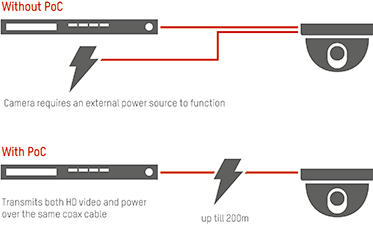
For installers this means a much more time- and cost-efficient installation. For example, in a conventional analogue system, the installer may need electrical engineers to set up wiring for an installation first. But with PoC, they can simply connect camera and DVR equipment directly, so there’s no need for this electrical preparation work.

End users, on the other hand, will find the products totally plug-and-play, with no configuration for camera access needed and power available straight away. PoC is also very stable, making it especially useful for regions with voltage instability issues.

“Because we can introduce a UPS system as a backup power supply for the DVR with PoC technology, when local power goes down, the UPS can power up the PoC DVR, and the PoC DVR can power up the PoC cameras accordingly,” says the Hikvision product manager.

For more information contact Hikvision South Africa, Evan Liu, +27 (0)10 035 1172, support.africa@hikvision.com, www.hikvision.com


Credit(s)


Share this article:
Share via emailShare via LinkedInPrint this page


Further reading:

In-ear hearing protection for firefighters
Fire & Safety Products & Solutions
Savox has launched Savox Fire Protect, a fully integrated firefighter communication system combining active in-ear hearing protection and wireless push-to-talk in a single, purpose-designed solution.

Read more...
Gallagher launches visitor management solution
Gallagher Products & Solutions Perimeter Security, Alarms & Intruder Detection
Gallagher Security has launched its visitor management solution powered by Kenai, a cloud-native platform that gives organisations a seamless, modern way to manage visitors, staff, and workplace operations.

Read more...
Video fire detection by Technoswitch
Technoswitch Fire Detection & Suppression Products & Solutions Fire & Safety
Video fire detection technology can complement broader fire detection strategies in environments where dust, dirt, fumes, moisture, light levels, temperature, or access conditions pose challenges for traditional technologies.

Read more...
Nimbus remote fire alarm management
Technoswitch Fire Detection & Suppression Products & Solutions Fire & Safety
Nimbus connects key stakeholders to their fire alarm systems, simplifying compliance with fire safety standards and greatly improving visibility into critical events, thereby augmenting first responder processes that save lives and protect assets.

Read more...
XERO aerosol range by Technoswitch
Technoswitch Fire Detection & Suppression Products & Solutions Fire & Safety
XERO’s fire suppression technology delivers a compact, cost-effective, long-service-life fire-extinguishing solution. The range offers electrically activated units that can be integrated into a fire detection and control system, as well as standalone thermally activated units.

Read more...
ALARM, intrusion & perimeter products 2026
Products & Solutions
The alarm, intrusion & perimeter product guide provides a selection of the latest products available in the security market, offering insight into their functionality and where they are available.

Read more...
Bullet cameras powered by large-scale AI models
Hikvision South Africa Perimeter Security, Alarms & Intruder Detection
Hikvision has announced new bullet cameras, powered by the Guanlan large-scale AI models. These smart cameras are designed to provide better perimeter protection with longer video content analysis (VCA) range and fewer false and repeated alarms.

Read more...
Fire safety from Technoswitch
Technoswitch Fire Detection & Suppression Products & Solutions

Server.MapPath() error 'ASP 0173 : 80004005'

Invalid Path Character

C:\INETPUB\VRTEWEBM01\PROJECTS\PARADIGM\1\../paradigm-e.vbs, line 1413

An invalid character was specified in the Path parameter for the MapPath method.