


These days, video systems are no longer limited to passive recording and storage of huge volumes of information (most of which is useless); they can incorporate a level of intelligence linked to specific actions.
The expanding set of options and the many methods available to manage video, mean you have to consider carefully your application needs and level of functionality. In this part of the series we will look at the factors that must be weighed up.
System design considerations
Bandwidth
The bandwidth needed for IP video depends on:
* Image resolution.
* Compression ratio.
* Frame rate.
* Complexity of the scene.
The significance of the required bandwidth in a given network is determined by some key system aspects:
Switched networks, which are common today, allow a single physical network to be split into two logical networks, separating video from general LAN traffic. With careful design, the video traffic will have minimal interaction with the data traffic.
Network speed is clearly important. As the prices of switches and routers continue to fall, Gigabit networks are becoming very affordable, and 10 Gb networks are starting to be more common. With such high-speed data capacity, video data rates are less of an issue, opening up new possibilities for remote video monitoring.
Event driven frame rate setting adjusts the frame rate when an event occurs. Most of the better cameras include event triggers for motion detection and digital inputs (for example, from a door switch) and the ability to be remotely triggered by an application. For most applications, a frame rate of 5-6 fps in idle time is quite acceptable, switching up to 25 or 30 fps when triggered. In many cases, the camera is set not to transmit at all when nothing of interest is happening.
Calculating bandwidth needs
A bandwidth calculator helps to determine the bandwidth a network video product will use, based on the image size and frame rate, and to calculate how much space a recorded image sequence would require.
Storage
IP video systems do demand large amounts of hard disk storage, which fortunately is becoming cheaper every year. We will address designing for redundancy and reliability in a later article, but here we consider how to calculate storage requirements.
Factors to consider when calculating storage needs:
* Number of cameras.
* Number of hours per day the camera will be recording.
* How long the data must be stored.
* Motion detection (or event-driven) only or constant recording.
* Other parameters such as frame rate, compression, image quality and complexity.
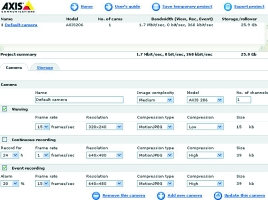
Here are some examples illustrating some of the factors:
JPEG/Motion JPEG
For JPEG or Motion JPEG single files are received (one file per frame). Storage requirements depend directly on frame rate, resolution and compression. Suppose we have three cameras as shown in Table 1, with different resolution and frame rates.
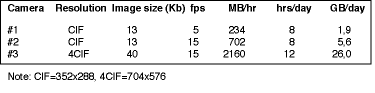
Calculation
Image size x frames per second x 3600s = KB per hour/1000 = MB per hour.
MB per hour x hours of operation per day/ 1000 = GB per day.
GB per day x requested period of storage = Storage need.
Total for the three cameras and 30 days of storage = 1002 GB.
MPEG-4
In MPEG-4, the images are received in a continuous data stream, ie, not individual files. The bit rate determines the storage requirements, and the bit rate depends on frame rate, resolution and compression, as well as the amount of motion in the scene. A typical bit rate has been used in the calculation. See Table 2.

Calculation
Bit rate/8 (bits in a byte) x 3600s = KB per hour/1000 = MB per hour.
MB per hour x hours of operation per day/ 1000 = GB per day.
GB per day x requested period of storage = Storage need.
Total for the three cameras and 30 days of storage = 204 GB.
Redundancy
There are various ways of protecting data against loss caused by hardware failure, and some also protect against deliberate efforts to delete evidence.
Hard disk RAID is a common technology that basically spans data over multiple disks in such a way that if one disk is lost the data can be reconstructed from the other disks.
Data replication involves file servers in the network being configured to replicate data between them.
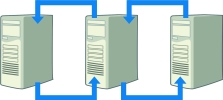
Tape backup typically involves taking tapes off-site as protection against data loss in the event of fire or theft.
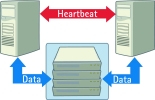
Server clustering has many variants. A common one has two servers working with the same storage device (often a RAID system). When one server fails, the other one takes over.
Multiple video recipients works by sending the video data simultaneously to multiple servers, usually in different locations.
System scalability
Scalability depends on the system chosen, and must be considered at the design stage.
Scalability steps: unlike digital video recorder (DVR) systems, which are generally supplied with fixed numbers of camera inputs so are only scalable in blocks of 4, 9 or 16 (typically), network video systems can be scaled up one camera at a time.
Number of cameras per recorder: In a network video system, a PC server records and manages the video. The more relevant measure is the total number of frames per second that must be supported. If 30 fps is needed for each camera, a single server may only support 25 cameras. If 2 fps is sufficient, 300 cameras could be supported. This makes for ready optimisation of the system.
Size of system: For larger installations, a network video system is easy to scale. When higher recording frame rates or longer recording times are needed, more processing and/or storage can be added to the server, or another server can be added at the same or a different location.
For more information contact Roy Alves, Axis Communications, +27 (0) 11 548 6780, [email protected]






© Technews Publishing (Pty) Ltd. | All Rights Reserved.
 printer friendly version