


Analog cameras of all types, such as fixed, dome, indoor, outdoor, fixed dome, pan/tilt/zoom, as well as specialty cameras, can all be integrated in a network video system using video servers. Simply connect the coax cable from the analog camera to the analog input on the video server, which then digitises, compresses, and transmits the video over a local network or across the Internet.
Once the video is on the network, it is identical to a video stream coming from a network camera, ready to be integrated into network video systems. Simply put: a video server turns an analog camera into a network camera. Depending on the configuration, number of cameras, camera type, and whether or not coax cabling is installed, different types of video servers can be used.
Anatomy of a video server
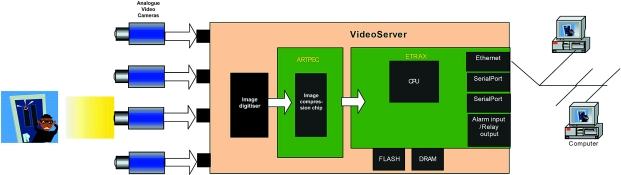
* The video server receives analog video input from the analog cameras into the image digitiser, which converts the analog video to digital format.
* The digital video is transferred to the compression chip, where the images are compressed to either JPEG still images or MPEG video.
* The next block contains the CPU, Ethernet connection, serial ports and alarm input and relay output. It handles the communication with the network, runs the internal web server, and handles all other functions (eg, drivers for different pan/tilt/zoom cameras).
* The Ethernet connection provides a direct network connection, and the serial ports (RS232 and RS485) enable control of the cameras' pan/tilt/zoom function or surveillance equipment such as time-lapse recorders. A modem can also be connected.
* The alarm inputs can be used to trigger the video server to start transmitting images, whilst relay outputs can start an action such as opening a door. Video servers equipped with image buffers can send pre-alarm images.
* The flash memory is the 'hard disk' of the video server and contains all software, such as the operating system and all applications needed in the product. The DRAM is the volatile memory, where programme execution and temporary data storage takes place.
Rack-mounted video servers
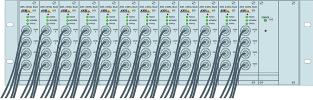
Most companies use a dedicated control room to centralise equipment in one location and efficiently monitor operations in a safe and secure environment for critical information. In a building containing a large number of analog cameras, this means that vast amounts of coax cabling run to the control room. If all coax cabling has already been installed and is available from the central room, the installation would benefit from using a video server rack which allows for a large number of blade video servers to be placed in one rack and managed centrally. A typical rack contains slots for up to 12 interchangeable blade video servers and provides network, serial communication and I/O connectors at the rear of each slot, as well as a common power supply. One 3U 19-inch rack can typically fit up to 48 channels with full frame rate, providing a high-density solution, saving valuable rack space.
Single port video servers
In a system where there are analog cameras but no coaxial cabling - where cameras are being redeployed, for example - it makes sense to place one-port video servers close to every analog camera. Apart from the reduced cabling cost, this avoids the loss of image quality experienced with analog cameras running over long coaxial cables. The digital images produced by a video server do not suffer loss of quality due to distance.
Video servers with PTZ and dome cameras
PTZ cameras can be connected to single port video servers as well as rack-mounted video servers, using the serial port (RS232/422/485) built into the video servers. Where a single port video server is used and located close to the camera, it adds the benefit of not having to run separate serial wiring to control the PTZ mechanism and the capability of performing PTZ control over large distances using the Internet. Drivers must be available in the video server to control specific PTZ cameras. A driver located on the PC running the video management software, can also be used if the serial port is set up as a serial server, which just passes through the commands.
Video decoder
In some installations, the network video and audio streams must be monitored on existing analog monitoring equipment. A network video decoder converts the network video and audio streams back to analog signals that can then be used by regular TV sets, analog monitors and video switches. Using an encoder/decoder is a very cost-effective way to transport analog video over a long distance (analog - digital - analog).
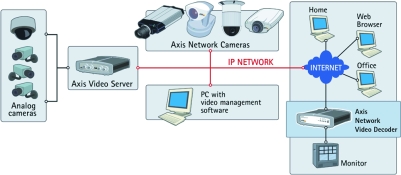
With a network video decoder, existing analog monitors can be used to receive video and audio from distant analog cameras or systems as though they were placed locally with the operator - even though they might be located in a different city.
For more information contact Roy Alves, SCS Distribution, 011 548 6780, [email protected], www.axisafrica.com






© Technews Publishing (Pty) Ltd. | All Rights Reserved.
 printer friendly version