


The concept of transmitting CCTV across a wireless link has been around for some years now and until recently was quite a costly exercise. The advent of CCTV equipment that can use computer networks has changed all that. The wireless LAN (local area network) is an easy and cost effective method of getting CCTV images from one place to another without all the wires we previously needed.
Not impressed? Well I am. Not since Archimedes jumped out of his bath crying "Eureka" have we had such a leap forward, tomorrow you should leap out of bed and shout, "Thank God, no more civils."
Well you can guess I am enthusiastic about the technology, but what about the downside? One thing that direct cabling does do, is to keep the traffic on the cable secure. When you connect over a wireless link you lose that security, effectively you are broadcasting a signal that can be subject to eavesdropping, interruption and even malevolent hacking of the system. Let us look at the negatives first, starting with the people that will use your wireless connection to freeload your system.
Hacking culture
Last year the Press ran many scare stories about mobile (wireless LAN) hackers. 'Wardriving' is using a laptop with a wireless LAN and high gain aerial to locate wireless accessible networks, usually in a big city. 'Warchalking' is marking buildings and pavements with chalk to indicate to other hackers, or let us call them freeloaders, where to find network access.
All that is required is a laptop with wireless LAN, special wireless sniffer software (readily found on the Internet), and a high gain aerial which can be made from a Pringles tin. It is easy, it is cheap.
Luckily the great majority of the freeloaders are only interested in accessing the Internet, perhaps to collect their e-mail in a foreign city.
Many companies, private individuals and retail outlets are now offering free public access to the Internet via their own wireless connection. Even more are providing access without any knowledge of the freeloader's presence.
So how do you protect your network from freeloaders? A circuit of the building, daily, rubbing off chalk marks is one method, but far more effective is setting up passwords on the WLAN units and enabling WEP (wired equivalence privacy) on the units. Easy to do but it is still surprising how many people just do not bother. WEP was intended to make wireless LAN as safe as a hard wired circuit, but when implemented did not have the total security required in today's world. Once again a short spell on the Internet will tell you how this security can be breached.
Firewalls
Firewalls are essential protection for a network. At their simplest level they should prevent unauthorised access but like most things there are a range of products from software-based firewalls through to firewall appliances; consisting of dedicated hardware and software.
While some firewalls may be adequate to protect against hacking from an external source - perhaps via an always-on Internet link, they may be entirely compromised by the addition of a wireless network point.
So when adding a wireless LAN link ensure that it is accounted for by your firewall and integrated as part of the network security.
Interruption of the signal
The signal can be interrupted when something comes between the two aerials in the link, or maybe the aerials are too far apart for reliable communication. This can usually be prevented by correct siting of the aerials, and in most cases it should not be an issue, but let us look at an example. Many years ago, I used to get calls complaining about the failure of a microwave CCTV link that spanned an Irish river, the Liffey I think. The phone would ring and the report was that the link was down, then the link would come back again. Eventually, patience wearing thin, I asked the engineer to look out the window and tell me what he could see, "There is a boat going past," - indeed.
So that has to be rule number one, ensure your signal will not be blocked, especially if you need to monitor the very boats that block your signals.
The dartboard effect
One key thing to remember is that wireless LAN signals operate in the 2,4 GHz band, and they are very low level signals. We are not talking searchlights piercing the night sky, it is more about candles and cigarette lighters. So our range is going to be defined in metres rather than kilometres. This is all to do with the distance the signal has to travel in free air. It is the old root mean square law, I will not trouble you with the maths, but if you double the transmission distance you reduce the signal to one quarter its strength. Wireless networks will compensate for reduced signal strength by reducing the speed of transmission.
This short scale transmission does have its advantages, you can keep transmission of signals within a site, even within a house, or with the right aerial beam the signal with pin point accuracy some tens or even hundreds of metres.
It is a line of sight technology in most cases, so watch out for anything that can interrupt the signal path.
Aerials
While most wireless LAN units have a small aerial attached, in most cases you may want to attach an aerial with better characteristics for your application. There are many types on the market but really you can split them into two groups, directional and omni-directional. Most commercial units will have a rubber duck style single pole aerial, which if upright should radiate signals to all points of the compass equally, this makes it an omni-directional type.
When it comes to purchasing a directional aerial the angle it covers will most likely be quoted. So if you get a 90° coverage you could place it in the corner of a warehouse and hopefully cover the entire area.
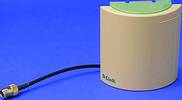
The narrower the angle, the more gain in the aerial, so the further the signal will travel. Narrow angle directional aerials are good for bridging between buildings.
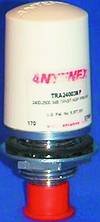
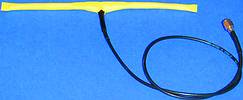
Sometimes a special project requires a special aerial. One application required the auto downloading of video information from a mobile network video server on board a train. This was to be done at the stations the train visited and all looked fine, until the time taken when the train was in the station proved too short to download the required video recording. So we came up with a half dipole aerial (see picture), that is one with a good gain in opposite directions with little to the sides. Ideal to cover the approach of a train to a station and cover its departure. Cost? Well the IP65 enclosure to keep it dry took the bulk of the money.
There seems to be no end to the ingenuity of amateur aerial designs, we have already mentioned the Pringles Cantenna, but you can also make a very directional aerial with a CD, in fact nearly anything metal in the kitchen can be crafted into a working aerial. Once again the resource is on the Internet, see our links list.

CCTV networks
Up to this point we have been talking about networks that may possibly share CCTV data and normal network traffic.
There are many good reasons to have the CCTV network isolated from the customer's main network. Primarily you do not have to worry about security breaches or being held responsible for compromising network integrity. Many new buildings have runs of CAT5 (twisted pair network cable) already wired through as spares. Even so CAT5 is one third of the price of co-axial CCTV camera cable, so installation has never been cheaper.
The big bonus
Hopefully we have covered the negatives and you are still interested enough to be reading this article. The ability to bridge distances and obstacles without the need for civils has to be a huge benefit for any installer, but what about other benefits? Dome IP cameras are now on the market, specific video servers and individual IP cameras can be integrated onto networks. You can make any of these a wireless link. Need to relocate a wireless IP camera? - Just move it a few metres, plug the power back in and away you go. Need a covert here for the weekend? No problem, just plug it in and forget the days when you had to plumb the coax back to the control room. Want to move an entire system to a new building? I guess you have the message.
The future of CCTV is very much rooted in IP and networks. In a few years time the video coax cable will seem as out of date as the time lapse VCR, if you are not connected by wireless LAN now, you soon will be.
For more information contact Jeff Berg, RemGuard UK, [email protected], www.remguard.co.uk
Pros and cons
Wireless LAN positives:
* Create bridges between buildings (no need for civils).
* Move cameras easily without re-cabling.
* Wireless coverts can be quickly installed.
Wireless LAN negatives:
* Opens the CCTV system to invasive action.
* May suffer interruption if aerials are badly sited.
Links
www.kismetwireless.net - Wireless network sniffer.
www.warchalking.org - The how and why of wireless freeloaders.
www.hackers.com - 'Nuff said.
www.hackers-resource.com - Excellent resource.
www.saunalahti.fi/~elepal/antenna2.html - Pringles Can-tenna design and theory www.frars.org.uk - Good amateur radio site with WLAN info on aerials, transmission distances, etc.
www.cs.umd.edu/~waa/wireless.html - If you are not yet worried about wireless integrity, read this.
Jargon buster
Firewall - in its simplest form prevents unauthorised access to a network.
Civils - digging holes and trenches to route wires from one place to another.
WECA - Wireless Internet Compatibility Alliance. This is a new organisation committed to promoting interoperability between different manufacturer's products.
WLAN - Wireless local area network
802.11b - current standard used by most wireless networks.
WEP - Wired equivalence privacy.
RC4 - cipher used to protect wireless networks.
WPA - Wi-Fi protected access.
Wi-Fi - Wireless Fidelity Association.
Warchalking - marking up areas with chalk to indicate to others there is an accessible wireless network here.
Wardriving - driving a car around with a laptop and network sniffer software in the hope of finding networks to freeload (illegal in Texas).
WNS - Wireless network sniffer black hat/white hat. In the hackers' world, goodies and baddies.






© Technews Publishing (Pty) Ltd. | All Rights Reserved.
 printer friendly version