


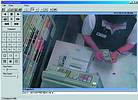
Digital video recorders capture POS transaction text so that loss prevention personnel can search for images by POS text as well as time, date or motion in a target area. They greatly reduce the time it takes to investigate suspicious transactions.
According to the University of Florida 2001 National Retail Security Survey, inventory shrinkage is costing American retailers $33 billion a year. That is as high as 2,97% of sales for some retail sectors. Although surveillance systems have been prevalent at the checkout counters of US retailers for years, they have heretofore come up short in helping to stop POS fraud. In the past, tape-based CCTV systems could not provide the clarity needed to identify individuals and what they were doing. Plus, it was extremely time-consuming to view tape to catch a clerk pilfering.
Not only do they eliminate VCR maintenance and videotape hassles, the new digital CCTV systems provide retailers with advanced weapons in battling such crime, saving management valuable time in investigating common sources of shrinkage, such as 'sweethearting', 'no sales' purchases and substitute scanning at the point of sale. By using methods detailed below, loss prevention personnel can determine whether or not a transaction was genuine or a costly fraud within seconds.
Images and text are associated for easy searches
Besides recording high resolution, extremely sharp digital images that capture detailed images of faces, numbers and small objects, a combination digital video multiplexer/recorder (DVMR) also captures the text that appears on a customer's receipt. It then associates it with the corresponding video and records all on internal hard drives.
To investigate a suspicious transaction, loss prevention personnel simply enter receipt text, such as 'no sale', 'void', 'return' or certain brand names. The DVMR can retrieve the associated video and transaction text immediately, eliminating time wasted previously viewing hours of videotape or using other analog recording methods. Personnel can also search by register, time, date or motion in a target area and view the POS text as they review images. Importantly, users can zoom in or change contrast and brightness without altering the original image.
When displaying receipt text, a separate window is displayed, similar to that of a scrolling cash register receipt. The window can be sized to display as many lines as the monitor will display. The system also allows users to easily review playback video and focus on specific transactions. By freezing the display, users can also highlight the desired receipt text lines, bring up the images associated with that text, and print out both the selected text and image.
The digital solution simplifies investigations by making images available wherever and whenever needed, whether on the far side of the building or other side of the nation. Disputes can be investigated and resolved quickly. The DVMR can also be plugged into a computer network or connected to a standard phone line. Multiple POS locations can be searched from a single DVMR or loss prevention personnel can instantly access and view live or recorded video from any networked POS terminal using any personal computer in the organisation's network.
Share images easily
New 'triple threat' digital solutions let personnel watch live and recorded images at the same time while the DVMR continues to record new images. Therefore, the system will not miss important events because others were being reviewed at that time.
Once recorded, video clips from the DVMR can be shared with other loss prevention personnel, human resources, management or even law enforcement. Users simply use their PCs to click and drag to the selected video, save the clip and then copy it to a CD. Other users, without needing any special software of their own, can view the clip immediately on their own computer systems (see 'Digital recording also helps small retailers solve theft issues faster' below).
Setting up the digital system
To efficiently store images, users typically record in a time-lapse mode, such as every four seconds. However, when transaction text is input, the drawer opens, a scan is made or merchandise is rung up, the recording speed can be programmed to automatically record more frames of video, which makes viewing easier. Some users even prefer to record in realtime to see clearly what is happening at the point-of-sale when a transaction is taking place.
Loss prevention personnel can configure settings for each camera individually. For instance, one camera can record continuously in time-lapse mode while a second camera records only when the DVMR detects motion in its field. A third camera could be configured to record only when a cashier swipes a card to activate a cash register.
Cameras viewing the register can record both during transactions and in between. In one scenario, the register camera is set for time-lapse plus event recording, which is based upon the presence of transaction text. Time-lapse recording is set for recording an image every two to four seconds. However, when transaction text occurs, the event-recording rate can increase to at least one to two images per second.
For better hard drive management, the register camera can employ a combination of time-lapse, activity and event recording. Time-lapse recording is kept at a very slow rate, such as an image every 50-100+ seconds. However, whenever there is motion in the scene, the activity-recording rate increases, perhaps up to an image every two seconds. Yet, whenever there is transaction text, recording of one to two images per second is instituted.
Regarding storage, digital CCTV is very flexible, especially when contrasted with having to constantly change tapes or lose images. Digital CCTV provides hard drive options from 40 GB to 1 TB. Retailers and other users can store days, weeks and even months of recorded images.
Interfacing with alarm systems for expanded flexibilities
In addition to being integrated with the data network, the DVMR can also interface with the alarm system, alarm sensors and/or access control system. If the sensor detects unwanted activity, the DVMR can be programmed to capture more images of the incident. In addition, security guards, managers, administrators, business owners and even law enforcement can be notified with an e-mail upon an alarm. They immediately know the location and nature of the alarm so they can remedy the problem immediately. They do not need to waste time by first checking the CCTV system for such details.
Without having to physically verify what is happening on their CCTV surveillance system, they can immediately respond to the alarm and take immediate action. No matter where those needing to be alerted might be, the DVMR sends them a message via their PC, laptop, PDA, cellphone or pager, notifying them of the type of alarm and where it is located.
Alarms can be e-mailed in response to alarm situations or external alarms. For instance, during set-up, the user can program the DVMR with conditions that count as alarms, based on object size and object location within a scene. Then, the surveillance system employs video motion detection to look through the camera, detect any changes within the scene and recognise them as alarm conditions. Users can additionally set detection sensitivity and false-alarm-rejection levels.
Once the alarm is triggered, the DVMR displays images from up to four cameras associated with the alarm area and sends a message to pre-selected e-mail addresses. Hardwired alarms such as door open or window open can also activate such e-mail messages.
Leveraging digital CCTV beyond loss prevention
Once in place, the digital system provides store managers with a training tool to review employee practices, showing clerks how to better provide shoppers with increased assistance. Marketing staff can watch live or recorded images to detect how new ideas in displays are capturing customer attention. Maintenance staff can be reviewed to ensure cleaning and upkeep is being performed as desired. Once such systems are in place, their use grows, amortising their costs way beyond what conventional tape-based systems offered in the past.
For more information contact Darren Nicholson, vice president - marketing, GE Interlogix Video Systems Group, www.ge-interlogix.com
Digital recording also helps small retailers solve theft issues faster
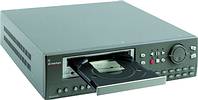
For smaller retailers, such as convenience stores and independent shops, digital recording technology provides an alternative to the above-described network and/or PC connection mode. They can employ a special 4-channel digital video recorder that features an auxiliary read/write CD unit that provides recorded CDs on demand. When an incident occurs, the user presses the 'record' button and enters the start time at which the CD unit should begin writing recorded images from the video recorder's hard disk.
For instance, if a convenience store is robbed at 2:15 pm, the user may want to start writing the CD at 2:05 pm, the approximate time the thieves entered the premises. Once the start time is entered, the user then pushes the 'record' button to create the CD. The video recorder immediately prints out all information, up to 650 MB, on a CD to present to law enforcement.
Having an immediate visual record to share with law enforcement, the insurance company and other regulators and authorities allows these smaller retailers to get their problems solved faster too. Law enforcement can instantly check the CD quickly to issue an all-points bulletin, insurance agents can start filing the claim faster, and other regulators and authorities have an immediate visual record of the event in question. Most importantly, the CD is available with two button touches.
To assure others can view the CD without delay, products such as the GE Interlogix StoreSafe has embedded its QuickWave software into the CD. The district attorney's office and others can simply slip the CD into their computers, open and review the recorded images at once without having to load any software on their computer.






© Technews Publishing (Pty) Ltd. | All Rights Reserved.
 printer friendly version