


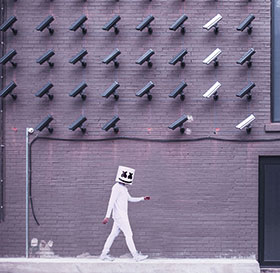
Surveillance cameras are a common sight in almost all residential estates these days, as they are in almost every public location around the world. And while cameras do offer enhanced security in many of these installations, disappointment is often the prevailing feeling when people try to use their surveillance footage as evidence for prosecuting criminals.
The immediate reaction to failed prosecutions, even when video footage caught the criminals red-handed, is often to blame the police or prosecutors for not doing their jobs properly. And while mistakes can be made by the authorities in their investigations and prosecutions, the most prevalent reason for video footage not being used in court can be laid squarely on the shoulders of those responsible for buying and installing the surveillance systems.

To find out how estates can make sure their surveillance does the job – securing the estate and helping to convict criminals – Hi-Tech Security Solutions invited Warrant Officer Bongiwe Gqotso to present at the Residential Estate Security Conference 2018 on some of the key points to consider when it comes to your surveillance installation. Below is a summary of her presentation.
Gqotso is the acting Image sub-section commander (Image Analysis) in the South African Police Service and has 10 years of practical experience in the forensic science laboratory as a forensic image analyst. She specialises in capturing still images from CCTV footage, performing image enhancement and providing photo albums for investigation purposes. She also performs video authenticity inspections, checking if the footage has been tampered with or not, and attends crime scenes to download video footage from CCTV systems.
Starting her presentation, Gqotso explained that often the police service is able to obtain video evidence of a crime, but is unable to use it in court due to two primary reasons: the placement of the cameras and the handling of evidence.
Placement of cameras
When deciding where to place your cameras, a common phrase might be: “We want a camera to cover the gate”. While this seems reasonable, without the proper advice and attention to the placement you may find you have terabytes of video footage that won’t even get into a courtroom, let alone assist in a conviction.
Gqotso says the placement of cameras requires careful consideration. She suggests asking the following questions before deciding on where to install your cameras, as well as what cameras you intend to purchase:
• Why do you want CCTV?
• What do you want to achieve from the system?
• Will the end product (the captured video) assist the investigating officers?
In short, the answers to the above are generally that your CCTV must testify on your behalf in court and obtain justice – in other words, the criminals must end up being convicted. To achieve these goals, your surveillance system must work for you, and to do this it needs to be set up to:
• Monitor,
• Detect,
• Recognise, and
• Identify.
In other words, you need to be able to monitor and observe an area and enable the viewer to know someone was there. The video must also be able to distinguish between a person and anything else. More than simply be able to recognise that a person is there, you need images that allow you to recognise a person and the characteristics of that person. Identification is critical, so you want to be able to recognise the person’s face. A cheap camera with blurred images won’t make the grade.
This means you need to be aware of the distance the camera has to cover, the angle at which you are viewing the area, the possibility that the person of interest will be wearing a cap or hoodie, and the need for an effective management or maintenance system.
Ideally, Gqotso says you need two cameras in each location. One to gain a wide-angle view of the area and another for close-up monitoring of people. Of course this is not always feasible, in which case the close-up camera is more important. You also need to avoid sharp angles in order to get a good picture of the person, especially their face, and you need to be aware of changing lighting during the course of the day and night. Bright sunlight shining directly into the camera lens can make identification hard or even impossible.
As far as management goes, Gqotso says there are three important issues to consider. Firstly, maintain the camera system. Make sure the lenses are clean and the cameras are focused where they are supposed to be. She has had the experience of dead bugs obscuring the view.
Secondly, make sure the date and time on all your cameras are accurate and synchronised. Something as irrelevant as a few minutes discrepancy can have your evidence thrown out of court. If you realise there is a discrepancy when collecting evidence of a crime, make a note of it immediately and tell the investigating officer.
Finally, and this shouldn’t be a surprise, make sure that your system is recording. Finding out that the system is displaying footage on screen but not recording it after an incident is not as uncommon as one may think.
Evidence management
Assuming you have a good installation and planned the placement of your cameras well, and that you have recorded evidence you want to use in court, the next step is managing the evidence properly. And while copying the footage for the investigating officer is often quite easy, simple mistakes can once again see your footage thrown out of court.
Gqotso advises estates not to let just anyone attempt to download the digital evidence if they are not familiar with the system. If in doubt, “call your technician while you are waiting for the investigating officer.”
As mentioned above, verify that the time on the system is correct before you download. If it is not, make notes for court purposes. Additionally, download the footage as soon as possible to prevent possible system overwrites once the disk is full.
Copy the footage to a CD or DVD. Do not take a screen grab of the footage with a cellphone or camera as the quality and integrity can be compromised and it opens the door to accusation of tampering by the defence. Gqotso assures that this is not a “no brainer”, but that she has seen instances where a cellphone was used to take a video of the screen displaying the CCTV footage.
One should also make two copies of any footage to be used as evidence. One should be given to the investigator and the other one kept safe in case the first is damaged – it is crucial to have a backup. Moreover, store the backup in a secure location with restricted access to in order to preserve the chain of evidence.
Check again
It will also help if you check, and perhaps double-check, that the video has been written to disk and that you are not giving the investigator an empty DVD. And do not, ever, edit the footage. Don’t add comments or draw circles around the accused or add your expert commentary to the video. Don’t cut out footage you consider irrelevant so that you end up with bits and pieces of footage.
And whatever you do, take notes. For example, who downloaded the footage, when, where, the time, who was present etc.
It is important to remember that a defence attorney can demand the evidence be rejected if there are any ‘unknowns’, changes or even misunderstandings in the collection and processing of it. Gqotso says the integrity of digital evidence must be maintained at all stages.
In addition, preserve the chain of evidence: “It is of vital importance that any digital exhibit can be tracked from the moment when it was downloaded at the crime scene all the way to the courtroom.”
As a final note, Gqotso added that you can use USB drives or SD cards to store video evidence, but these are prone to corruption and the defence may make an issue about whatever might have been on the drive previously. Using a new CD or DVD will also allow you to lock the disk so that nothing else can be added and nothing can be changed once the information is copied.
The Warrant Officer ended her presentation with a variety of example images taken from real situations she has had to deal with (they were, of course, anonymised). In many situations, crime scenes had camera coverage, but the images were not of the quality to be submitted in court, due to poor quality cameras, bad lighting, the distance to the subject, the angle of the cameras and more.
You are making a significant investment in your surveillance infrastructure. It is worth taking care to ensure you do it properly so that the system is able to provide the evidence required to take any criminal activities from incident to conviction.
| Tel: | +27 11 543 5800 |
| Email: | [email protected] |
| www: | www.technews.co.za |
| Articles: | More information and articles about Technews Publishing |






© Technews Publishing (Pty) Ltd. | All Rights Reserved.
 printer friendly version