


An enterprise system can mean different things to different people. In this instance we are defining an enterprise system as maintaining central control over an entire access control system, while each local facility maintains independent control of its individual operations.
Its power gives system administrators at the main facility the ability to configure and monitor all locations from that single site. It also allows them to simultaneously monitor alarms from multiple facilities from one convenient workstation. Whether your organisation consists of a few facilities that are locally dispersed or many that span the globe, an enterprise solution scales as your company grows.
The main factor to keep in mind when you begin to plan the migration to an enterprise access control solution is preparation. You need to know what resources are available to you, who the key players are to help you in this process, and how to develop a solid plan to get the system up and running successfully.
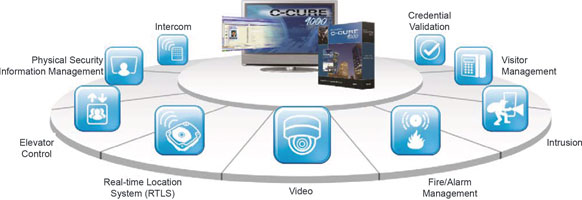
When migrating to an enterprise system, you will want to avoid the following pitfalls:
1. Failure to define the ‘operational paradigm’.
2. Failure to define performance and scalability expectations.
3. Poor coordination between multiple vendors.
4. Moving data without a plan.
5. Poor preparation for the unknown.
1. Failure to define the ‘operational paradigm’
Define the operational paradigm for:
* Administrative processes.
* Reporting.
* Monitoring and control experience (graphical expectations).
There are some critical questions that you will want to answer as you begin a migration to an enterprise access control system. Are you able to improve the administrative and monitoring workflow? Will this process improve the overall operation? How will you be able to leverage the new technology? Ultimately, this is the perfect time to define existing pain points up front and not wait until the end of the project. Take a close look at your existing model or old technology. What reports can you take advantage of? What should be updated? With the migration to an enterprise system you will have an increased amount of alarm monitoring capabilities and you should incorporate them into your workflow. You will want to utilise existing habits and leverage new features. It has been our experience that the migration process offers the owner an opportunity to review and ultimately clean up their existing database which has been subjected to years of management by different people.
It is also key to streamline reporting before you begin this type of project. Your business has information everywhere – information about people, policies, ideas, and money. That kind of information is what drives a business’ success – or its downfall if not harvested, organised, and managed properly. How much data will you need to retain? What was your previous journal management process? Will you need to move previous journals for future reporting? All of these reporting questions are important to answer before migrating to an enterprise system. Advanced reporting solutions such as Software House’s Business Intelligence Reporting Suite (BIRS) are designed to harvest and organise your business information properly.
2. Failure to define performance and scalability expectations
Every system has a limit. Understanding the volume of activity that you are planning to put through your enterprise will allow for proper definition of the overall system architecture. One of the key elements of this analysis is the understanding of input activity such as Door State Monitor or Request to Exit traffic. Software House’s Smart Services can assist in obtaining this data from existing systems as you move to an enterprise solution.
3. Poor coordination between multiple vendors
An enterprise system incorporates collaboration from multiple departments. The system runs across many facilities and requires coordination from multiple vendors. It is crucial to clearly communicate with all vendors, departments, and any other external groups that may be involved in the migration process. One should expect to have the key integrator(s), IT, and Software House Smart Services involved in the migration process.
The integrators will be called in to install all of your various applications including fire, security, CCTV, intrusion, visitor management and any others that you would like to include in your overall system. It is also important to incorporate version control and user experience to ensure that the integrations run smoothly.
Your IT team will help you move to a virtual environment. They are the experts who fully understand the IT environment and what needs to be monitored during the migration.
Software House’s Smart Services team will work with you to perform the pre-migration audit. They will audit all of your existing systems to assess rogue inputs and outputs or any other errors in the system. They will help identify potential problems within your existing database that could be taking up additional space. They will also identify hidden information that is not logged to the journal.
For example, a past user may have configured a point to not record to the journal because it was creating excessive traffic, making it easier to shut off rather than solving the core issue. Or an input point was removed from the database but not from the controller. The pre-migration audit will help identify: broken hardware, credentials that may not need to be moved from one system to another and un-trusted points (service related reports). If a point has not gone active in the past two years, is it really reliable? During the audit, Smart Services professionals will discover all of these errors in the existing system and help you solve them before the migration.
4. Moving data without a plan
Migrating from your existing access control system to an enterprise solution requires a solid plan. You will need to form a team. Who is going to set this up? Who will maintain the enterprise system and data once it is running? Your team should include individuals from human resources, security operations, IT, and server management. It is very important that you, or someone you designate, carefully coordinate between all of these people.
Once you have identified the team you will need to assign task owners. This should be clearly documented in a master schedule, which also defines the deliverables for each individual team member. These deliverables will include import and export requirements, report requirements and owners of the data. This will also allow you to determine any issues that may have arose from the imported training information. These issues may be stored in a separate location until identified and an import solution is put in place to properly handle the update of personnel and credentials.
5. Poor preparation for the unknown
Poor preparation for the unknown is the final pitfall to avoid when implementing an enterprise level access control system. By fully understanding your complete system and everything surrounding it, you will better be able to visualise the potential risk factors. Be aware of firewalls, virus protection, malware, backups, high availability, data sources, desktop policies, upgrade policies, and more. The pre-audit of all hardware components will help you determine a part of this as well. You should have your plan in place and know what details you want to include ahead of time. These steps will help you prepare for potential issues and maximise the success of your migration.
For more information contact Tyco Security Products, +27 (0)82 566 5274, [email protected], www.tycosecurityproducts.com
| Email: | [email protected] |
| www: | www.johnsoncontrols.com/security |
| Articles: | More information and articles about Johnson Controls - (Tyco Security Products) |





© Technews Publishing (Pty) Ltd. | All Rights Reserved.
 printer friendly version