


The 1989 sci-fi comedy Back to the Future 2, set in 2015, got a lot of things wrong about the future. Flying cars? Nope. Fax machines everywhere? No. Dehydrated food for dinner? Thankfully not! But it did get one thing mostly right: Fingerprint readers are now a pervasive part of our lives, unlocking everything from our phones to our home and office doors.
Why do companies ranging from sports teams to care centres for the elderly choose fingerprint readers and fingerprint door locks? We’ve assembled some of the most common uses, along with real world case studies to illustrate them.
Fingerprint readers for foolproof time and attendance
The Leicester City Football Club is a Premier League team with a 32 000-person stadium. Because of its scale, it must manage approximately 450 safety stewards who ensure the security and safety of every fan who turns up to a match.
Each of these professionals must be paid correctly based on the hours they work. Imagine trying to manage this with an analogue system based on sign-in sheets, or paper cards, or a digital system based on employee ID numbers. The line-ups. The mistakes. The lost papers. It would be chaos.
Instead, the football club installed Suprema fingerprint readers at employee entry and exit points, allowing safety stewards to clock in with a single, unforgeable touch. The process takes less than a second and the system is directly integrated with the club’s payroll software and the access control system for the entire stadium. Importantly, the system was also rolled out in a way that is GDPR-compliant.
Fingerprint readers are user friendly
Spaces for people who are especially young or old require especially intuitive access control systems. This makes fingerprint readers ideal, as there are no cards to lose or PINs to forget. Just touch the fingerprint reader and the door unlocks for people who have access.
Wolverhampton Grammar School uses an access control system based on Suprema’s fingerprint readers to keep students and faculty safe while giving them easy access to all the buildings on campus. The school’s IT systems director, Paul Hancox, specifically points out that a fingerprint access control system eliminates the need for students to memorise PIN codes that change frequently.
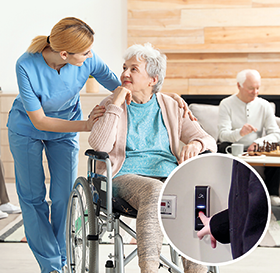
On the other end of the age spectrum is WCS Care, a residential care home for older people, including those with dementia.
Prior to upgrading to fingerprint door locks staff had to carry around large keyrings. According to Ed Russ II, director of innovation and development at WCS Care, this made them look more like jailers than caretakers. But fingerprint readers offer benefits beyond optics.
Many care homes use PIN-based systems. These are slow and inconvenient compared to fingerprint readers, which are nearly instantaneous. Restricting access to specific sections of buildings that use PIN-based access control means setting different numerical codes for different doors. These codes must be changed frequently to be effective, as it is easy to watch people key in their codes. Suprema’s fingerprint readers, connected to the BioStar 2 management portal, can manage access person-by-person and room-by-room with up to 128 access groups.
This precise level of control means that relatives of residents can come and go freely during visiting hours without being able to enter restricted areas. All visits are also logged automatically.
Fingerprint readers for high security applications
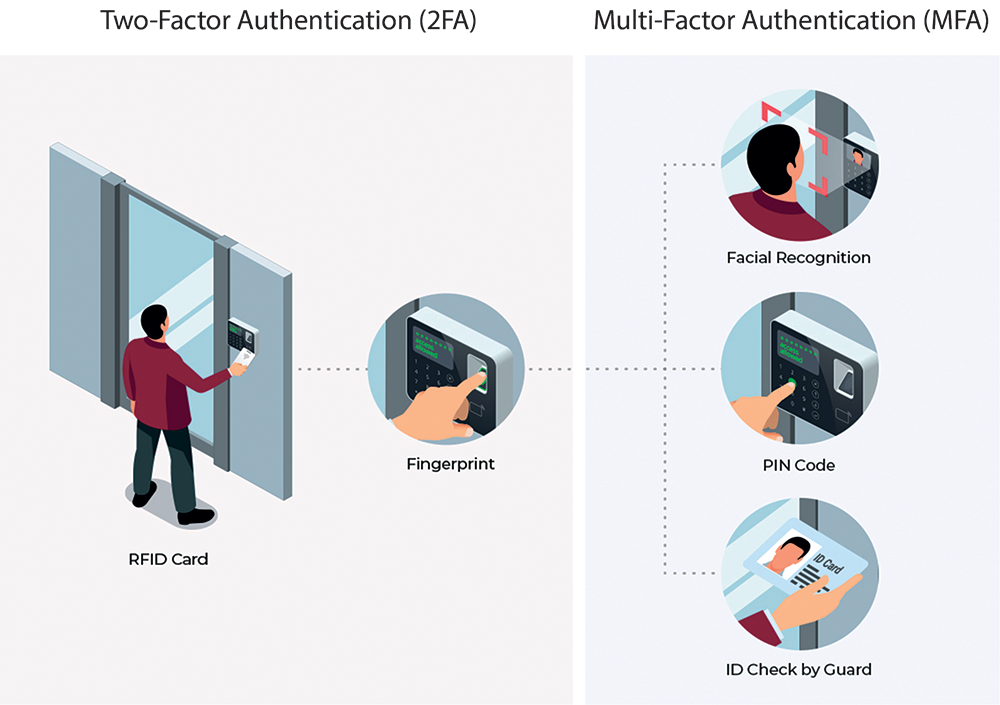
For sensitive facilities like data centres and research labs, fingerprint readers can provide a second layer of security with two-factor authentication (2FA) or multi-factor authentication (MFA).
You’ve probably encountered 2FA when logging into your email or bank account and being prompted to enter a code from an authenticator app or text message. (If you haven’t encountered this yet, you soon will. Google will soon require 2FA for all Gmail users).
When fingerprint readers are part of an access control system with 2FA it generally works like this: To gain entry, an employee first taps an RFID access badge and then authenticates their identity by touching the fingerprint reader. In other words, the fingerprint confirms that the employee who should have the badge is, in fact, the person with the badge.
Multi-factor authentication takes this further, adding additional confirmation and authentication steps such as facial recognition or a security guard checking identification.
As you can imagine, data centres and research labs are hesitant to share any specific information about their security procedures and systems. So, unfortunately, we cannot share case studies covering their use of fingerprint readers as part of two-factor authentication.
These case studies are meant to illustrate how fingerprint readers and fingerprint door locks can be used as part of a secure access control system or time and attendance system.
| Tel: | +27 11 784 3952 |
| Email: | [email protected] |
| www: | www.suprema.co.za |
| Articles: | More information and articles about Suprema |






© Technews Publishing (Pty) Ltd. | All Rights Reserved.
 printer friendly version